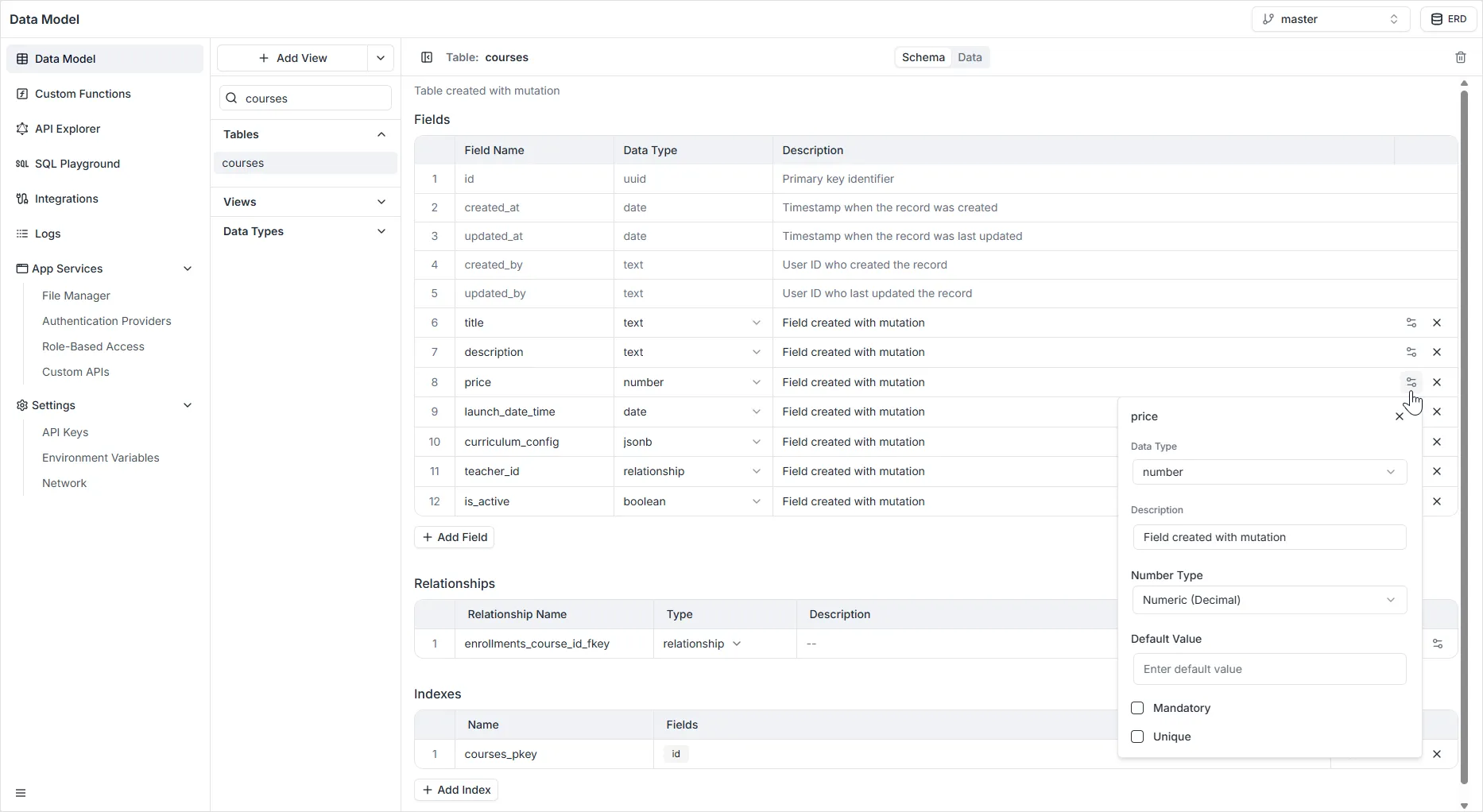
Number Field
The Number field is designed to store numerical data that may require mathematical calculations (like sorting, summing, or averaging) or strict validation. Unlike text fields, this type ensures that only valid numbers are entered.
Configuration Properties
Section titled “Configuration Properties”When configuring a Number field in the right-hand sidebar, the following settings are available:
- Name: The unique system identifier for the field (e.g.,
age,quantity,price). - Number Type: Defines the precision and storage capacity of the number. You must select one of the following:
- Integer (INT): Standard whole numbers without decimals. Suitable for counts, ages, or quantities. (Range: approx. -2 billion to +2 billion).
- Big Integer (BIGINT): Large whole numbers. Use this when the value might exceed the range of a standard Integer, such as for high-traffic counters or complex IDs.
- Float (REAL): Floating-point numbers that support decimals. Essential for data requiring precision, such as currency, weights, percentages, or scientific measurements.
- Default Value: A numerical value automatically assigned to new records if left blank (e.g., setting
0for a “score” field). - Description: An optional note explaining the field’s purpose.
- Mandatory: If enabled, the record cannot be saved unless a number is provided.
- Unique: If enabled, ensures no two records contain the same number (rarely used for numbers, but useful for things like “Rank” or “Serial Number”).