Slack
Slack is a team collaboration platform used for messaging and workflow automation. Integrating Slack allows your application to send notifications, alerts, or interactive messages directly to your team’s channels.
Configuration Steps
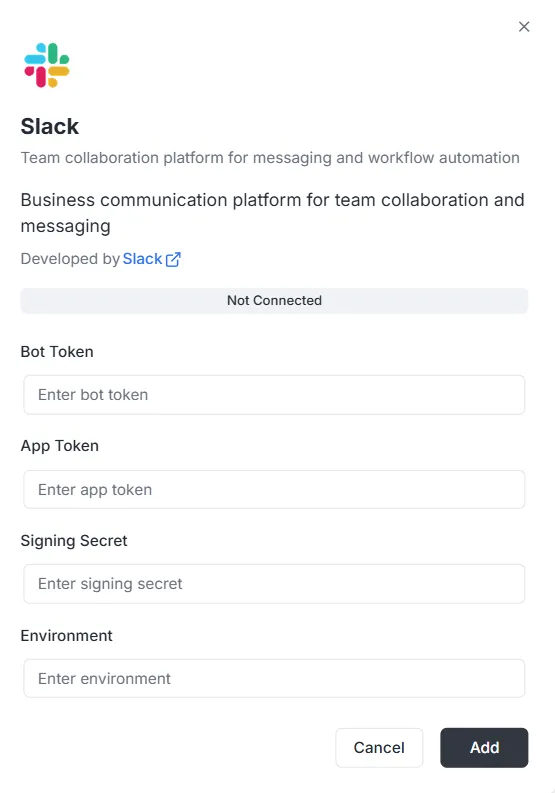
Section titled “Configuration Steps”After selecting Slack from the integration list, a configuration modal will appear. You must provide the following credentials from your Slack App settings to establish the connection:
1. Bot Token
Section titled “1. Bot Token”- Input: Enter your Bot User OAuth Token (usually starting with
xoxb-) into the Bot Token field.
2. App Token
Section titled “2. App Token”- Input: Enter your App-Level Token (usually starting with
xapp-) into the App Token field. This is often used for socket mode or event subscriptions.
3. Signing Secret
Section titled “3. Signing Secret”- Input: Enter the Signing Secret found in your Slack App’s “Basic Information” section. This ensures that requests sent to your app are authentically from Slack.
4. Environment
Section titled “4. Environment”- Input: Specify the target environment (e.g.,
ProductionorDevelopment) in the Environment field to manage where this integration applies.
Finalizing the Connection
Section titled “Finalizing the Connection”Once all credentials are entered:
- Review the status bar (currently showing Not Connected).
- Click the black Add button at the bottom right to save the configuration and activate the integration.