Date Field
The Date field is used to store temporal data. Depending on the configuration, it can handle simple calendar dates (like a birthday) or precise moments in time (like a transaction timestamp).
Configuration Properties
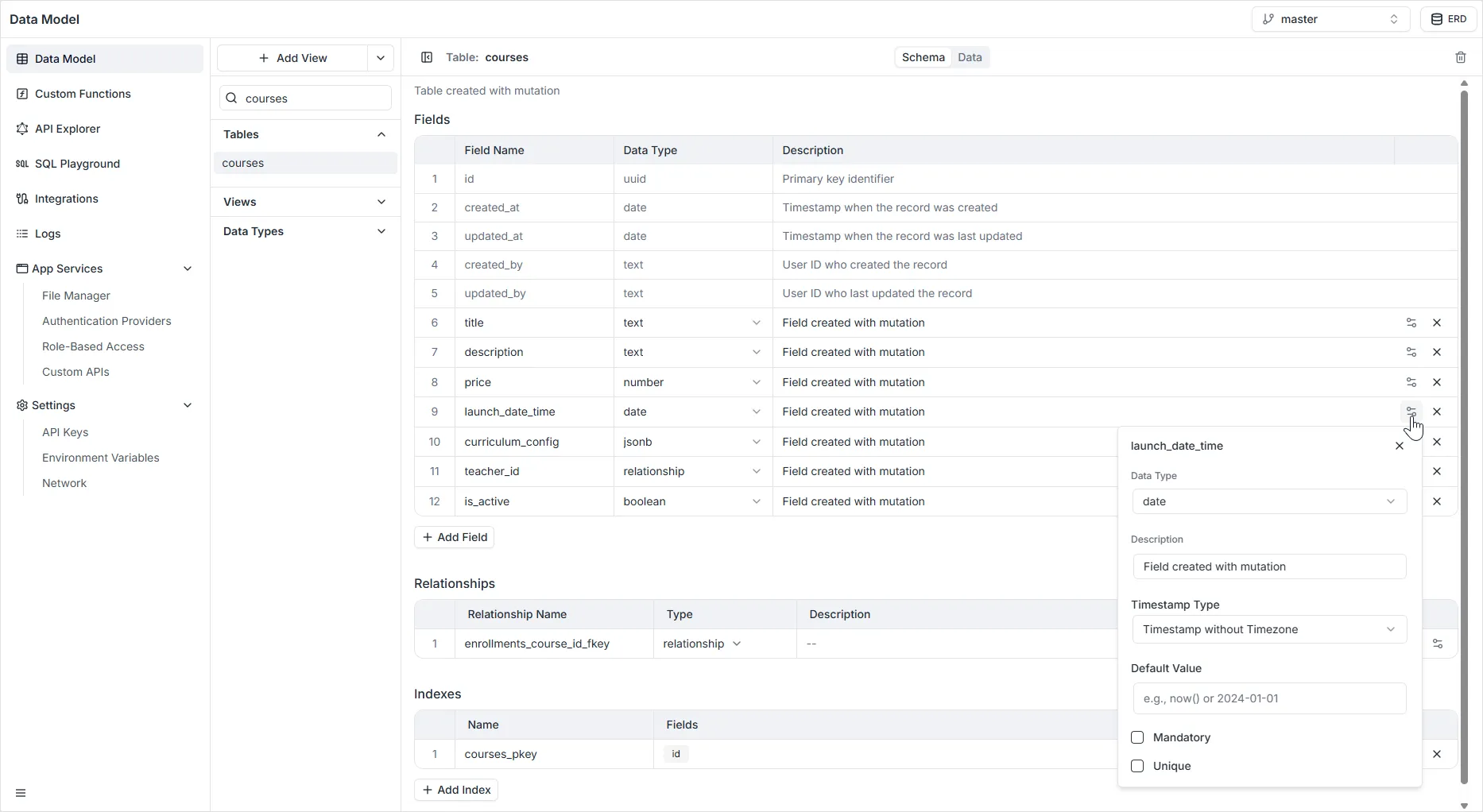
Section titled “Configuration Properties”When configuring a Date field in the right-hand sidebar, the following settings are available:
- Name: The unique system identifier for the field (e.g.,
date_of_birth,created_at). - Timestamp Type: Defines how the database stores the time data. There are three specific options:
- Date: Stores only the calendar date (Year, Month, Day). No time information is recorded. Best for birthdays or holidays.
- Timestamp with time zone: Stores both the date and time, adjusting for time zones. This is the recommended setting for recording specific moments in history (like when a user logs in), as it normalizes data to UTC.
- Timestamp without time zone: Stores the date and time exactly as entered, ignoring time zones. Best for abstract concepts like “Shop opens at 9:00 AM” (which applies regardless of where the viewer is).
- Default Value: A value that will be automatically assigned to the field if no data is provided. This is often used for setting a record’s creation time automatically.
- Description: An optional text box to describe the purpose of the field.
- Mandatory: If enabled, enforces a
NOT NULLconstraint. The record cannot be saved without a date. - Unique: If enabled, ensures that no two records have the same date/time value.