Stripe
Stripe is an online payment processing platform designed for internet businesses. Integrating Stripe allows your application to handle transactions, subscriptions, and financial data securely.
Configuration Steps
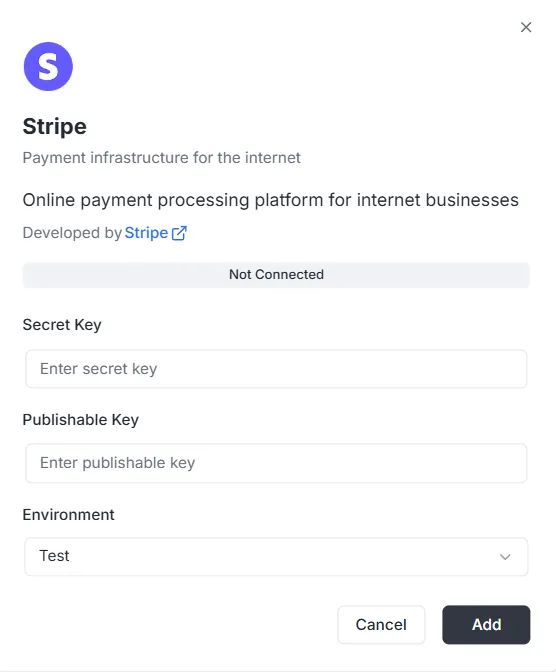
Section titled “Configuration Steps”After selecting Stripe from the integration list, a configuration modal will appear. You must provide the following credentials from your Stripe Dashboard to establish the connection:
1. Secret Key
Section titled “1. Secret Key”- Input: Enter your private Stripe Secret Key (usually starting with
sk_) into the Secret Key field. This key allows the backend to authenticate secure requests.
2. Publishable Key
Section titled “2. Publishable Key”- Input: Enter your public Stripe Publishable Key (usually starting with
pk_) into the Publishable Key field. This key is used for frontend implementation.
3. Environment
Section titled “3. Environment”- Input: Select the appropriate environment context from the dropdown menu (e.g., Test for development/sandbox mode or Production for live processing).
Finalizing the Connection
Section titled “Finalizing the Connection”Once the keys and environment are configured:
- Review the status bar (currently showing Not Connected).
- Click the black Add button at the bottom right to save the credentials and activate the payment integration.
Stripe Integration API Reference
Section titled “Stripe Integration API Reference”- Configuration Management
- Customer Management
- Payment Intents
- Subscriptions
- Products and Prices
- Invoices
- Refunds
- Checkout Sessions
- Billing Portal Sessions
- Payment Methods
- Webhook Events
- Pagination
- Error Handling
Configuration Management
Section titled “Configuration Management”configureStripe
Section titled “configureStripe”Creates a new Stripe configuration for the project and environment.
Mutation:
mutation ConfigureStripe ( $input: ConfigureStripeInput!) { configureStripe ( input: $input ) { id publishableKey webhookUrl }}Input:
input ConfigureStripeInput { secretKey: String! # Stripe secret key (sk_test_... or sk_live_...) publishableKey: String! # Stripe publishable key (pk_test_... or pk_live_...) environment: StripeEnvironment! # TEST or LIVE webhookSecret: String # Webhook signing secret (optional)}Response:
type ConfigureStripePayload { id: ID! # Configuration ID publishableKey: String! # Publishable key webhookUrl: String! # Generated webhook URL}Example:
{ "input": { "secretKey": "sk_test_...", "publishableKey": "pk_test_...", "environment": "TEST", "webhookSecret": "whsec_..." }}Notes:
- The secret key is encrypted with AES-256-GCM before storage
- Only one configuration per project/environment combination
- Returns error if configuration already exists
updateStripeConfig
Section titled “updateStripeConfig”Updates an existing Stripe configuration.
Mutation:
mutation UpdateStripeConfig ( $input: UpdateStripeConfigInput!) { updateStripeConfig ( input: $input ) { id publishableKey webhookUrl }}Input:
input UpdateStripeConfigInput { secretKey: String # Optional publishableKey: String # Optional environment: StripeEnvironment # Optional webhookSecret: String # Optional}Response:
type UpdateStripeConfigPayload { id: ID! publishableKey: String! webhookUrl: String!}Notes:
- All fields are optional
- Only provided fields are updated
- Secret key is encrypted if provided
Customer Management
Section titled “Customer Management”stripe_customer
Section titled “stripe_customer”Retrieves a single customer by ID.
Query:
query stripe_customer{ stripe_customer( id: "cus_Ts..." ) { id name email phone description metadata object createdAt }}stripe_customers
Section titled “stripe_customers”Lists customers with pagination and optional filtering.
Query:
query stripe_customers ( $first: Int, $after: String, $customerId: String) { stripe_customers ( first: $first, after: $after, customerId: $customerId ) { edges { node { id name email phone description createdAt } cursor } pageInfo { hasNextPage hasPreviousPage startCursor endCursor } }}Parameters:
first: Number of items to return (default: 10)after: Cursor for paginationcustomerId: Filter by customer ID (optional)
stripe_createCustomer
Section titled “stripe_createCustomer”Creates a new customer.
Mutation:
mutation stripe_createCustomer { stripe_createCustomer ( input: { name: "Customer", email: "example@archie.com", phone: "+573001230001", description: "Description Example" metadata: { data1: "Example data1", data2: "Example data2" } } ) { id name email phone description metadata object createdAt }}stripe_updateCustomer
Section titled “stripe_updateCustomer”Updates an existing customer.
Mutation:
mutation stripe_updateCustomer { stripe_updateCustomer( id: "cus_Ts...", input: { name: "Customer", email: "example@archie.com", phone: "+573001230001", description:"Description Example", metadata: { data1: "Example data1 updated", data2: "Example data2 updated" } } ) { id name email phone description metadata object createdAt }}Notes:
- All fields are optional
- Only provided fields are updated
stripe_deleteCustomer
Section titled “stripe_deleteCustomer”Deletes a customer.
Mutation:
mutation stripe_deleteCustomer { stripe_deleteCustomer ( id: "cus_Ts...")}Response:
- Returns
trueon success - Returns error if customer not found
Payment Intents
Section titled “Payment Intents”stripe_paymentIntent
Section titled “stripe_paymentIntent”Retrieves a single payment intent by ID.
Query:
query stripe_paymentIntent { stripe_paymentIntent ( id: "pi_3Su..." ) { id customerId paymentMethodId currency amount status metadata object clientSecret createdAt }}stripe_paymentIntents
Section titled “stripe_paymentIntents”Lists payment intents with pagination and optional filtering.
Query:
query stripe_paymentIntents ( $first: Int, $after: String, $customerId: String) { stripe_paymentIntents ( first: $first, after: $after, customerId: $customerId ) { edges { node { id customerId paymentMethodId currency amount status metadata object clientSecret createdAt } cursor } pageInfo { hasPreviousPage hasNextPage startCursor endCursor } }}Parameters:
first: Number of items to return (default: 10)after: Cursor for paginationcustomerId: Filter by customer ID (optional)
stripe_createPaymentIntent
Section titled “stripe_createPaymentIntent”Creates a new payment intent.
Mutation:
mutation stripe_createPaymentIntent { stripe_createPaymentIntent ( input: { amount: 12.35, currency: "usd", customerId: "cus_Ts...", paymentMethodId: "pm_1Su...", automaticPaymentMethods: true } ) { id customerId paymentMethodId currency amount status metadata object clientSecret createdAt }}Notes:
clientSecretis returned for frontend confirmation- Use
automaticPaymentMethods: truefor Stripe.js integration
stripe_updatePaymentIntent
Section titled “stripe_updatePaymentIntent”Updates a payment intent before confirmation.
Mutation:
mutation stripe_updatePaymentIntent{ stripe_updatePaymentIntent( id: "pi_3S...", input: { amount: 36.92, currency: "usd", paymentMethodId: "pm_1Su..." metadata:{ data1: "Example data1" } } ) { id customerId paymentMethodId currency amount status metadata object clientSecret createdAt }}Notes:
- Can only be updated before confirmation
- All fields are optional
stripe_confirmPaymentIntent
Section titled “stripe_confirmPaymentIntent”Confirms a payment intent.
Mutation:
mutation stripe_confirmPaymentIntent{ stripe_confirmPaymentIntent( id: "pi_3Su..." input: { paymentMethodId: "pm_1Su...", returnUrl: "http://localhost:3000/successful-payment" } ) { id customerId paymentMethodId currency amount status metadata object clientSecret createdAt }}Notes:
- Required for completing payment
- May require 3D Secure authentication
- Returns updated status (succeeded, requires_action, etc.)
stripe_cancelPaymentIntent
Section titled “stripe_cancelPaymentIntent”Cancels a payment intent.
Mutation:
mutation stripe_cancelPaymentIntent { stripe_cancelPaymentIntent( id: "pi_3Su..." ) { id customerId paymentMethodId currency amount status metadata object clientSecret createdAt }}Notes:
- Can only cancel payment intents that are not succeeded or canceled
- Status changes to “canceled”
Subscriptions
Section titled “Subscriptions”stripe_subscription
Section titled “stripe_subscription”Retrieves a single subscription by ID.
Query:
query stripe_subscription { stripe_subscription(id: "sub_1Su...") { id customerId status currentPeriodStart currentPeriodEnd createdAt cancelAtPeriodEnd metadata object items { data { id priceId quantity } } }}stripe_subscriptions
Section titled “stripe_subscriptions”Lists subscriptions with pagination and optional filtering.
Query:
query stripe_subscriptions ( $first: Int, $after: String, $customerId: String) { stripe_subscriptions ( first: $first, after: $after, customerId: $customerId ) { edges { node { id customerId status currentPeriodStart currentPeriodEnd createdAt cancelAtPeriodEnd metadata object items { data { id priceId quantity } } } cursor } pageInfo { hasPreviousPage hasNextPage startCursor endCursor } }}Parameters:
first: Number of items to return (default: 10)after: Cursor for paginationcustomerId: Filter by customer ID (optional)status: Filter by status (optional)
stripe_createSubscription
Section titled “stripe_createSubscription”Creates a new subscription.
Mutation:
mutation stripe_createSubscription { stripe_createSubscription ( input: { customerId: "cus_TsQ...", items: { priceId: "price_1Su...", quantity: 1 }, metadata: { data1: "Example data1" }, trialPeriodDays: 0 } ) { id customerId status currentPeriodStart currentPeriodEnd createdAt cancelAtPeriodEnd metadata object items { data { id priceId quantity } } }}Notes:
paymentBehaviorcan be “default_incomplete” for subscriptions requiring payment method- Trial period is specified in days
- Latest invoice and payment intent are automatically expanded
stripe_updateSubscription
Section titled “stripe_updateSubscription”Updates an existing subscription.
Mutation:
mutation stripe_updateSubscription { stripe_updateSubscription( id: "sub_1Sv..." input: { cancelAtPeriodEnd: false metadata: { data2: "Example data2" } } ) { id customerId status currentPeriodStart currentPeriodEnd createdAt cancelAtPeriodEnd metadata object items { data { id priceId quantity } } }}stripe_cancelSubscription
Section titled “stripe_cancelSubscription”Cancels a subscription.
Mutation:
mutation stripe_cancelSubscription { stripe_cancelSubscription ( cancelAtPeriodEnd: true, id: "sub_1Sv..." ) { id customerId status currentPeriodStart currentPeriodEnd createdAt cancelAtPeriodEnd metadata object items { data { id priceId quantity } } }}Parameters:
id: Subscription ID (required)cancelAtPeriodEnd: If true, cancels at period end; if false, cancels immediately (default: false)
Notes:
- Immediate cancellation: subscription ends now
- Period end cancellation: subscription continues until current period ends
Products and Prices
Section titled “Products and Prices”stripe_products
Section titled “stripe_products”Lists products with pagination.
Query:
query stripe_products ( $first: Int, $after: String) { stripe_products ( first: $first, after: $after ) { edges { node { id name description active metadata object createdAt } cursor } pageInfo { hasPreviousPage hasNextPage startCursor endCursor } }}stripe_createProduct
Section titled “stripe_createProduct”Creates a new product.
Mutation:
mutation stripe_createProduct { stripe_createProduct ( input: { name: "Product 01", description: "Description product 01", metadata: { data1: "Example data1" } } ) { id name description active metadata object createdAt }}stripe_prices
Section titled “stripe_prices”Lists prices with pagination and optional filtering.
Query:
query stripe_prices ( $first: Int, $after: String, $productId: String) { stripe_prices ( first: $first, after: $after, productId: $productId ) { edges { node { id productId active currency unitAmount object metadata createdAt recurring { interval intervalCount } } cursor } pageInfo { hasPreviousPage hasNextPage startCursor endCursor } }}Parameters:
first: Number of items to return (default: 10)after: Cursor for paginationproductId: Filter by product ID (optional)
stripe_createPrice
Section titled “stripe_createPrice”Creates a new price.
Mutation:
mutation stripe_createPrice { stripe_createPrice ( input: { productId: "prod_Tst...", unitAmount: 25.85, currency: "usd", recurring: { interval: "month", intervalCount: 1 }, metadata: { data1: "Example data1" } } ) { id productId currency unitAmount active object createdAt metadata recurring { interval intervalCount } }}Notes:
- Omit
recurringfor one-time prices intervalmust be one of: “day”, “week”, “month”, “year”
Invoices
Section titled “Invoices”stripe_invoice
Section titled “stripe_invoice”Retrieves a single invoice by ID.
Query:
query stripe_invoice { stripe_invoice ( id: "in_1Su..." ) { id customerId subscriptionId currency amountPaid amountDue status object metadata createdAt lineItems { data { id description currency amount quantity } } }}Notes:
- Subscription ID is populated via API expansion when available
stripe_invoices
Section titled “stripe_invoices”Lists invoices with pagination and optional filtering.
Query:
query stripe_invoices ( $first: Int, $after: String, $customerId: String, $status: String) { stripe_invoices ( first: $first, after: $after, customerId: $customerId, status: $status ) { edges { node { id customerId subscriptionId currency amountPaid amountDue status object metadata createdAt lineItems { data { id description currency amount quantity } } } cursor } pageInfo { hasPreviousPage hasNextPage startCursor endCursor } }}Parameters:
first: Number of items to return (default: 10)after: Cursor for paginationcustomerId: Filter by customer ID (optional)status: Filter by status (optional)
stripe_payInvoice
Section titled “stripe_payInvoice”Pays an invoice programmatically.
Mutation:
mutation stripe_payInvoice { stripe_payInvoice ( id: "in_1Sv..." ) { id customerId subscriptionId currency amountPaid amountDue status object metadata createdAt lineItems { data { id description currency amount quantity } } }}Notes:
- Attempts to pay the invoice using the customer’s default payment method
- Returns error if payment fails
- Updates invoice status to “paid” on success
Refunds
Section titled “Refunds”stripe_refunds
Section titled “stripe_refunds”Lists refunds with pagination and optional filtering.
Query:
query stripe_refunds ( $first: Int, $after: String, $paymentIntentId: String) { stripe_refunds ( first: $first, after: $after, paymentIntentId: $paymentIntentId ) { edges { node { id paymentIntentId reason status currency amount metadata object createdAt } cursor } pageInfo { hasPreviousPage hasNextPage startCursor endCursor } }}Parameters:
first: Number of items to return (default: 10)after: Cursor for paginationpaymentIntentId: Filter by payment intent ID (optional)
stripe_createRefund
Section titled “stripe_createRefund”Creates a refund for a payment intent.
Mutation:
mutation stripe_createRefund { stripe_createRefund ( input: { paymentIntentId: "pi_3Sv...", amount: 200, reason: "requested_by_customer" } ) { id reason paymentIntentId status currency amount object metadata createdAt }}Notes:
- Omit
amountfor full refund reasoncan be: “duplicate”, “fraudulent”, “requested_by_customer”- Refund status starts as “pending” and updates to “succeeded” or “failed”
Checkout Sessions
Section titled “Checkout Sessions”stripe_createCheckoutSession
Section titled “stripe_createCheckoutSession”Creates a Stripe Checkout Session for one-time payments or subscriptions. Returns a URL that redirects customers to Stripe’s hosted payment page.
Mutation:
mutation CreateCheckoutSession($input: StripeCreateCheckoutSessionInput!) { stripe_createCheckoutSession(input: $input) { id url customerId customerEmail paymentIntentId subscriptionId mode status currency amountTotal metadata createdAt }}Input:
input StripeCreateCheckoutSessionInput {  customerId: String              # Existing Stripe customer ID (optional)  customerEmail: String            # Customer email for new customers (optional)  mode: String!                   # "payment" for one-time or "subscription" for recurring  successUrl: String!             # URL to redirect after successful payment  cancelUrl: String!              # URL to redirect if customer cancels  lineItems: [StripeCheckoutSessionLineItemInput!]!  # Items to purchase  paymentMethodTypes: [String!]    # Allowed payment methods (optional)  metadata: Map                    # Custom metadata (optional)}
input StripeCheckoutSessionLineItemInput {  priceId: String      # Stripe Price ID (for existing prices)  quantity: Int!        # Quantity of items  amount: Float         # Custom amount in dollars (for one-time payments)  currency: String      # Currency code (required if amount is provided)}
Response:
type StripeCheckoutSession { id: ID! # Session ID object: String! # "checkout.session" url: String! # Redirect URL for customer customerId: String # Customer ID (if customer exists) customerEmail: String # Customer email paymentIntentId: String # Payment Intent ID (for one-time payments) subscriptionId: String # Subscription ID (for subscriptions) mode: String! # "payment" or "subscription" status: String! # Session status currency: String # Currency code amountTotal: Float # Total amount in dollars metadata: Map # Custom metadata createdAt: Time! # Creation timestamp}Example - One-time Payment:
{ "input": { "mode": "payment", "successUrl": "https://example.com/success", "cancelUrl": "https://example.com/cancel", "lineItems": [ { "priceId": "price_1234567890", "quantity": 1 } ] }}Example - Custom Amount One-time Payment:
{ "input": { "mode": "payment", "customerEmail": "customer@example.com", "successUrl": "https://example.com/success", "cancelUrl": "https://example.com/cancel", "lineItems": [ { "amount": 29.99, "currency": "usd", "quantity": 1 } ] }}Example - Subscription:
{ "input": { "mode": "subscription", "customerId": "cus_1234567890", "successUrl": "https://example.com/success", "cancelUrl": "https://example.com/cancel", "lineItems": [ { "priceId": "price_monthly_subscription", "quantity": 1 } ] }}Notes:
- The
urlfield contains the redirect URL that customers should be sent to - For one-time payments, use
mode: "payment"and provide eitherpriceIdoramount+currency - For subscriptions, use
mode: "subscription"and providepriceId(must be a recurring price) - Either
customerIdorcustomerEmailshould be provided, but not both paymentMethodTypescan include: “card”, “us_bank_account”, “link”, etc.- Sessions expire after 24 hours if not completed
Billing Portal Sessions
Section titled “Billing Portal Sessions”stripe_createBillingPortalSession
Section titled “stripe_createBillingPortalSession”Creates a Stripe Billing Portal session that allows customers to manage their subscriptions, payment methods, and billing information through Stripe’s hosted portal.
Mutation:
mutation CreateBillingPortalSession($input: StripeCreateBillingPortalSessionInput!) { stripe_createBillingPortalSession(input: $input) { id url customerId returnUrl createdAt }}Input:
input StripeCreateBillingPortalSessionInput { customerId: String! # Stripe customer ID (required) returnUrl: String! # URL to redirect after customer exits portal configuration: String # Portal configuration ID (optional)}Response:
type StripeBillingPortalSession { id: ID! # Session ID object: String! # "billing_portal.session" url: String! # Redirect URL for customer customerId: String! # Customer ID returnUrl: String # Return URL createdAt: Time! # Creation timestamp}Example:
{ "input": { "customerId": "cus_1234567890", "returnUrl": "https://example.com/account" }}Notes:
- The
urlfield contains the redirect URL that customers should be sent to - The portal session is short-lived and expires after use
- Customers can manage subscriptions, update payment methods, view invoices, and update billing information
- Portal features are configured in the Stripe Dashboard
- If
configurationis not provided, the default portal configuration is used - The portal only shows subscriptions and invoices for the specified customer
Payment Methods
Section titled “Payment Methods”stripe_paymentMethods
Section titled “stripe_paymentMethods”Lists payment methods with pagination and optional filtering.
Query:
query stripe_paymentMethods ( $first: Int, $after: String, $customerId: String) { stripe_paymentMethods( first: $first, after: $after, customerId: $customerId ) { edges { node { id customerId type object metadata createdAt card { brand expMonth expYear last4 } } cursor } pageInfo { hasPreviousPage hasNextPage startCursor endCursor } }}Parameters:
first: Number of items to return (default: 10)after: Cursor for paginationcustomerId: Filter by customer ID (optional)
Notes:
- Only safe card information is returned (last4, brand, expiration)
- Full card numbers are never exposed
stripe_attachPaymentMethod
Section titled “stripe_attachPaymentMethod”Attaches a payment method to a customer.
Mutation:
mutation stripe_attachPaymentMethod { stripe_attachPaymentMethod ( id: "pm_1Sv...", input: { customerId: "cus_Ts4..." } ) { id customerId type card { brand expMonth expYear last4 } metadata object createdAt }}Notes:
- Payment method must be created first (typically via Stripe.js)
- Attached payment methods can be used for subscriptions and payments
stripe_detachPaymentMethod
Section titled “stripe_detachPaymentMethod”Detaches a payment method from a customer.
Mutation:
mutation stripe_detachPaymentMethod { stripe_detachPaymentMethod ( id: "pm_1Sv..." ) { id customerId type card { brand expYear expMonth last4 } metadata object createdAt }}Notes:
- Detached payment methods can no longer be used for payments
- Returns the payment method with
customerIdset to null
Webhook Events
Section titled “Webhook Events”stripe_webhookEvents
Section titled “stripe_webhookEvents”Lists webhook events received by the service.
Query:
query ListWebhookEvents ( $first: Int, $after: String) { stripe_webhookEvents ( first: $first, after: $after ) { edges { node { id type data processed createdAt } cursor } pageInfo { hasNextPage hasPreviousPage endCursor } }}Response:
type StripeWebhookEvent { id: ID! type: String! # Event type (e.g., "payment_intent.succeeded") data: String! # JSON string of event data processed: Boolean! # Whether event has been processed createdAt: Time!}Parameters:
first: Number of items to return (default: 10)after: Cursor for pagination
Notes:
- Events are automatically received via webhook endpoint
- Events are stored after signature verification
datafield contains the full event payload as JSON string
Pagination
Section titled “Pagination”All list queries support cursor-based pagination using the Relay connection pattern.
PageInfo
Section titled “PageInfo”type PageInfo { hasNextPage: Boolean! hasPreviousPage: Boolean! startCursor: String endCursor: String}Usage Example
Section titled “Usage Example”query ListCustomers ( $first: Int, $after: String) { stripe_customers ( first: $first, after: $after ) { edges { node { id email } cursor } pageInfo { hasNextPage endCursor } }}Pagination Flow:
- Initial request:
first: 10, after: null - Use
pageInfo.endCursorfrom response asafterin next request - Check
hasNextPageto determine if more pages exist
Default Values:
first: Defaults to 10 if not providedafter: Starts from beginning if not provided
Error Handling
Section titled “Error Handling”All operations return GraphQL errors with user-friendly messages. Errors are mapped from Stripe API errors to provide clear feedback.
Common Error Scenarios
Section titled “Common Error Scenarios”Configuration Errors:
400: Invalid Stripe keys format404: Project or configuration not found400: Configuration already exists
Customer Errors:
404: Customer not found400: Invalid customer data
Payment Intent Errors:
404: Payment intent not found400: Invalid amount or currency402: Payment failed (card declined, insufficient funds, etc.)
Subscription Errors:
404: Subscription not found400: Invalid subscription parameters400: Cannot update canceled subscription
Stripe Error Codes: Common Stripe error codes are mapped to user-friendly messages:
card_declined: “Your card was declined”insufficient_funds: “Insufficient funds”invalid_number: “Invalid card number”expired_card: “Card has expired”incorrect_cvc: “Incorrect CVC code”
Error Response Format
Section titled “Error Response Format”{ "errors": [ { "message": "Customer not found", "extensions": { "code": "NOT_FOUND", "stripeErrorCode": "resource_missing" } } ], "data": null}Data Types
Section titled “Data Types”StripeEnvironment
Section titled “StripeEnvironment”enum StripeEnvironment { TEST # Test mode LIVE # Live/production mode}Map Scalar
Section titled “Map Scalar”The Map scalar type represents a key-value map where:
- Keys are strings
- Values can be strings, numbers, booleans, or nested maps
- Used for metadata fields
Example:
{ "metadata": { "order_id": "12345", "user_id": "67890", "premium": true }}Time Scalar
Section titled “Time Scalar”The Time scalar type represents ISO 8601 formatted timestamps.
Example: "2025-11-16T00:28:48.081Z"