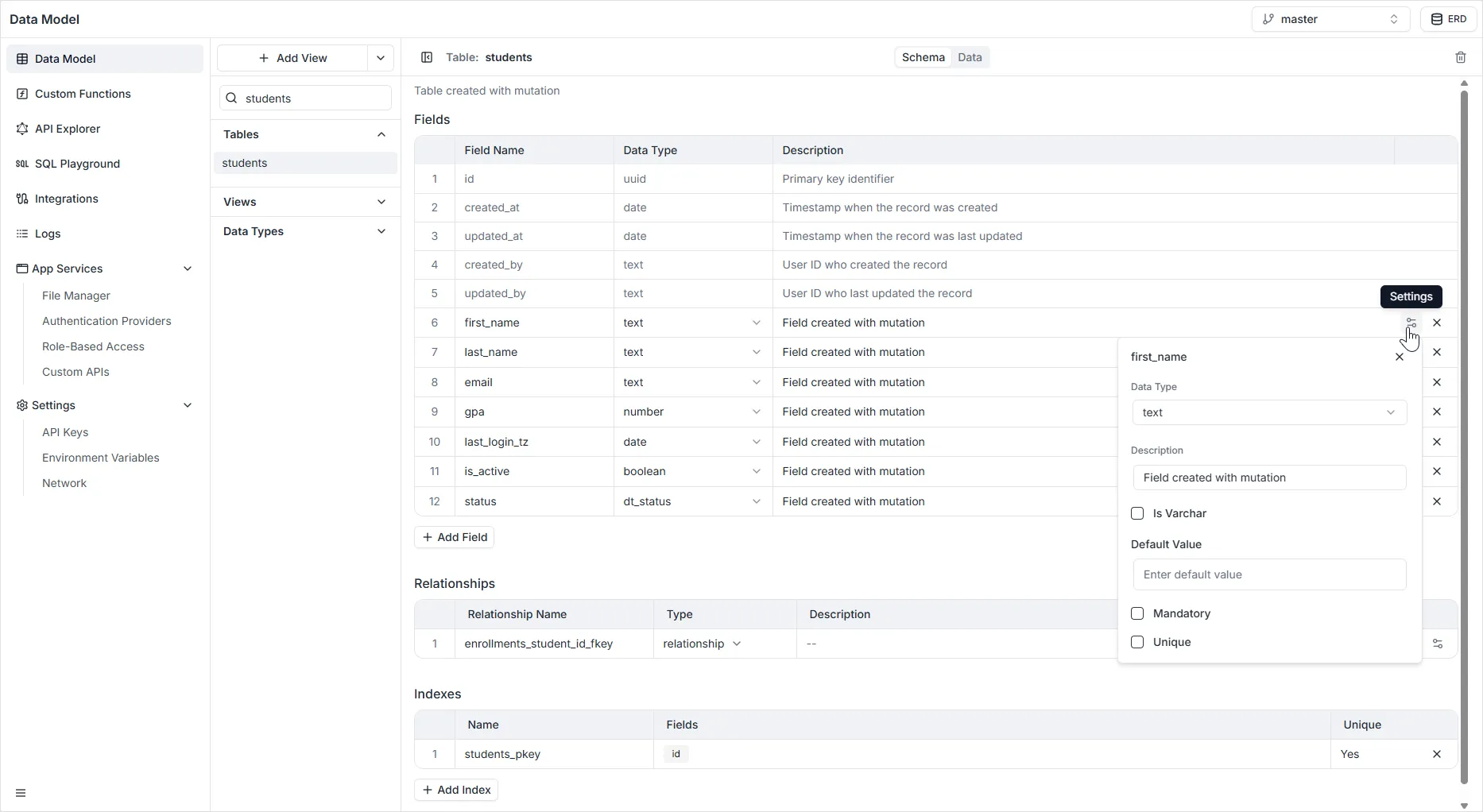
Text Field
The Text field is used to store alphanumeric string data. It is the most versatile field type, suitable for storing everything from short strings (like names or titles) to long-form content (like descriptions or comments).
Configuration Properties
Section titled “Configuration Properties”When configuring a Text field in the right-hand sidebar, the following settings are available:
- Name: The unique system identifier for the field (e.g.,
first_name). This is the key used in API queries and mutations. - Is Varchar:
- Unchecked (Default): The field is created as a
TEXTtype in the database, allowing for strings of variable length with no specific limit (up to 1GB in PostgreSQL). - Checked: The field is handled as a
VARCHAR. Depending on the platform configuration, this may allow you to specify a maximum character limit (length constraint).
- Unchecked (Default): The field is created as a
- Default Value: A value that will be automatically assigned to the field if no data is provided during record creation.
- Description: An internal note to describe the purpose of the field for other developers or administrators.
- Mandatory: If enabled, enforces a
NOT NULLconstraint. Records cannot be created or saved if this field is empty. - Unique: If enabled, enforces a
UNIQUEconstraint. No two records in the table can have the same value for this field (useful for Emails, Usernames, or IDs).