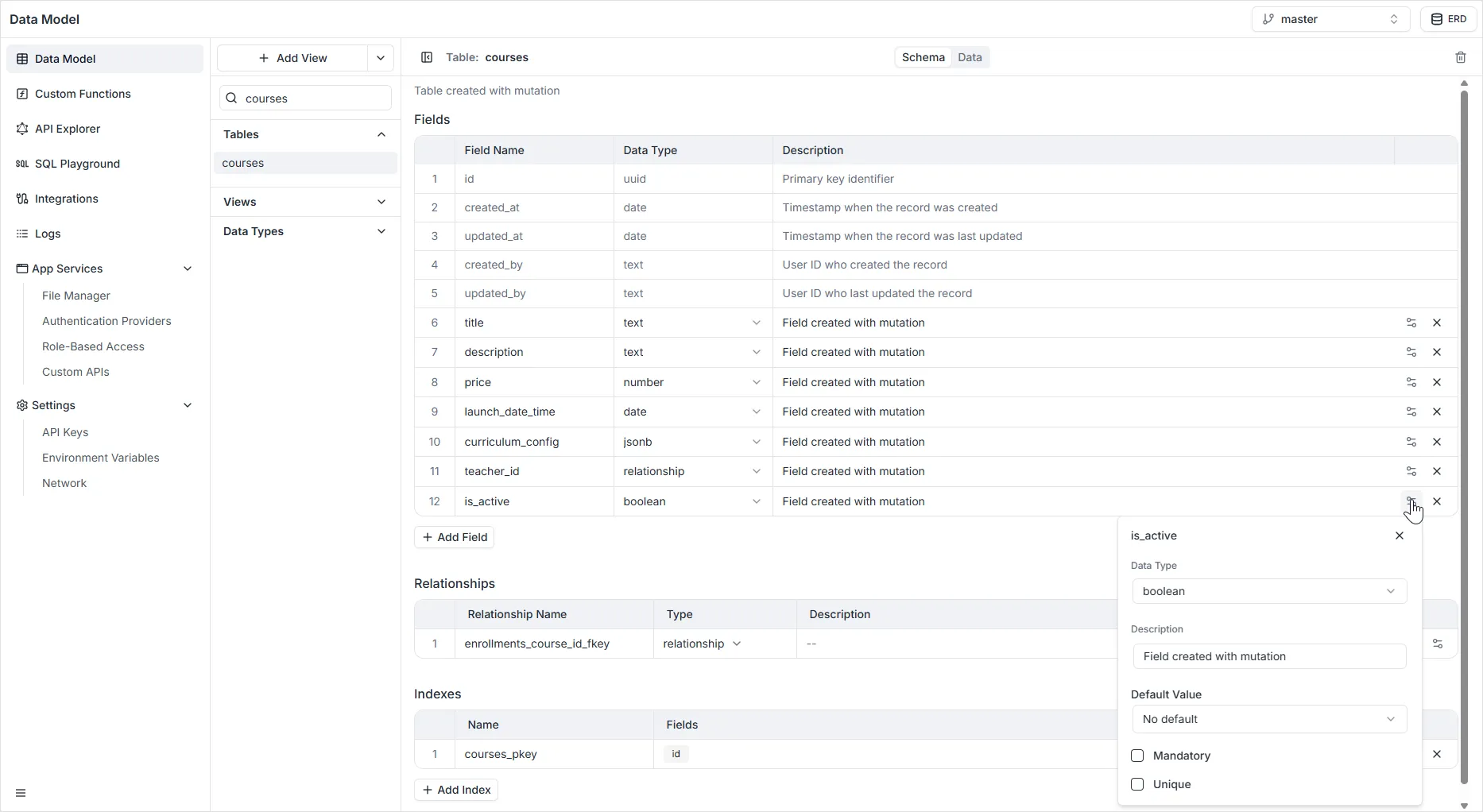
Boolean Field
The Boolean field (often visualized as a Switch) is used to store binary logic values: True or False. It is the most efficient way to handle “Yes/No” or “On/Off” data points.
Configuration Properties
Section titled “Configuration Properties”When configuring a Boolean field in the right-hand sidebar, the following settings are available:
- Name: The unique system identifier for the field (e.g.,
is_enrolled,is_active,has_paid). - Default Value: Determines the initial state of the field when a new record is created. You can select:
- No default value: The field starts as
null(undefined) unless manually set. - True: The field defaults to the “On” / “Yes” state.
- False: The field defaults to the “Off” / “No” state.
- No default value: The field starts as
- Description: An optional text box to describe the purpose of the flag.
- Mandatory: If enabled, the field must have a value (it cannot be
null). Note: For Booleans, this usually means the value must be explicitly set to True or False. - Unique: If enabled, ensures that values in this column are unique across the entire table.
- Warning: For a Boolean field, enabling Unique is rarely useful, as it would limit the entire table to containing only one record with
Trueand one record withFalse.
- Warning: For a Boolean field, enabling Unique is rarely useful, as it would limit the entire table to containing only one record with