Table Settings
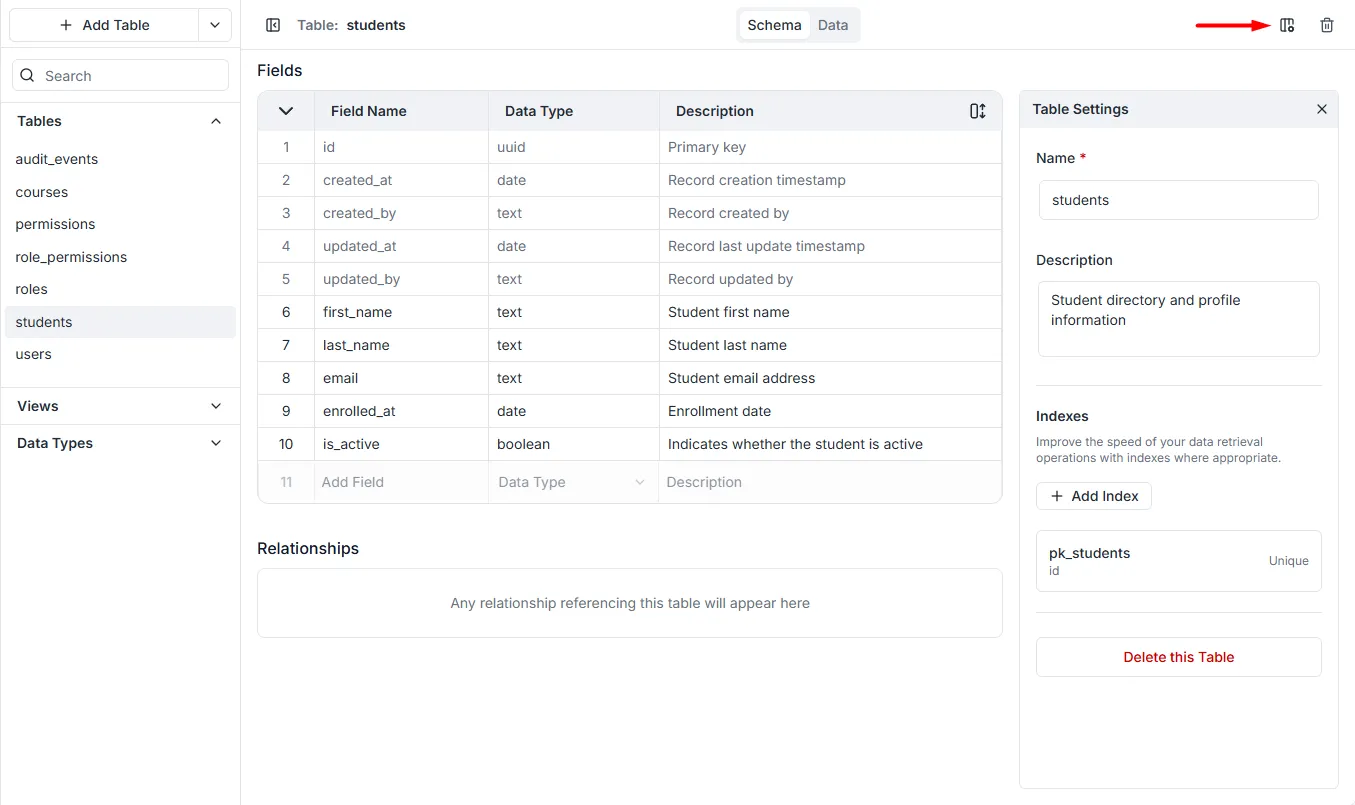
The Table Settings panel allows you to configure high-level attributes of the table, manage performance indexes, and delete the table entirely.
To open table settings, select the table you want to work on, and then click the icon.
General Configuration
Section titled “General Configuration”- Name: The unique system identifier for the table (e.g.,
students).- Important: This name is used directly in your generated GraphQL API queries (e.g.,
studentsList,createStudent). It is best practice to use lowercase, plural names (e.g., useusersinstead ofUser).
- Important: This name is used directly in your generated GraphQL API queries (e.g.,
- Description: An optional text area to document the purpose of the table for your team (e.g., “Student directory and profile information”). This does not affect the API but is helpful for maintenance.
Indexes
Section titled “Indexes”This section allows you to manage database indexes to optimize query performance.
- What is an Index? An index is a data structure that improves the speed of data retrieval operations on a database table. Without an index, the database must scan every row to find relevant data.
- Default Indexes: The system automatically creates a Primary Key index (e.g.,
pk_students) on the uniqueidfield. - + Add Index: Click this button to create custom indexes on fields you frequently filter or sort by (e.g., if you often search students by
emailorlast_name, adding an index to those fields will make the search much faster).
Danger Zone
Section titled “Danger Zone”- Delete this Table: Clicking this button initiates the process to permanently remove the table from the schema.
- Warning: This action is irreversible. Deleting a table will destroy all records stored within it. If this table is related to other tables (e.g., a
Schoolstable linking toStudents), those relationships will also be severed.
- Warning: This action is irreversible. Deleting a table will destroy all records stored within it. If this table is related to other tables (e.g., a