Fields
Tables columns are made up of fields. Fields have different types of data, such as text, numbers, and dates.
Working with Fields
Section titled “Working with Fields”Creating Fields
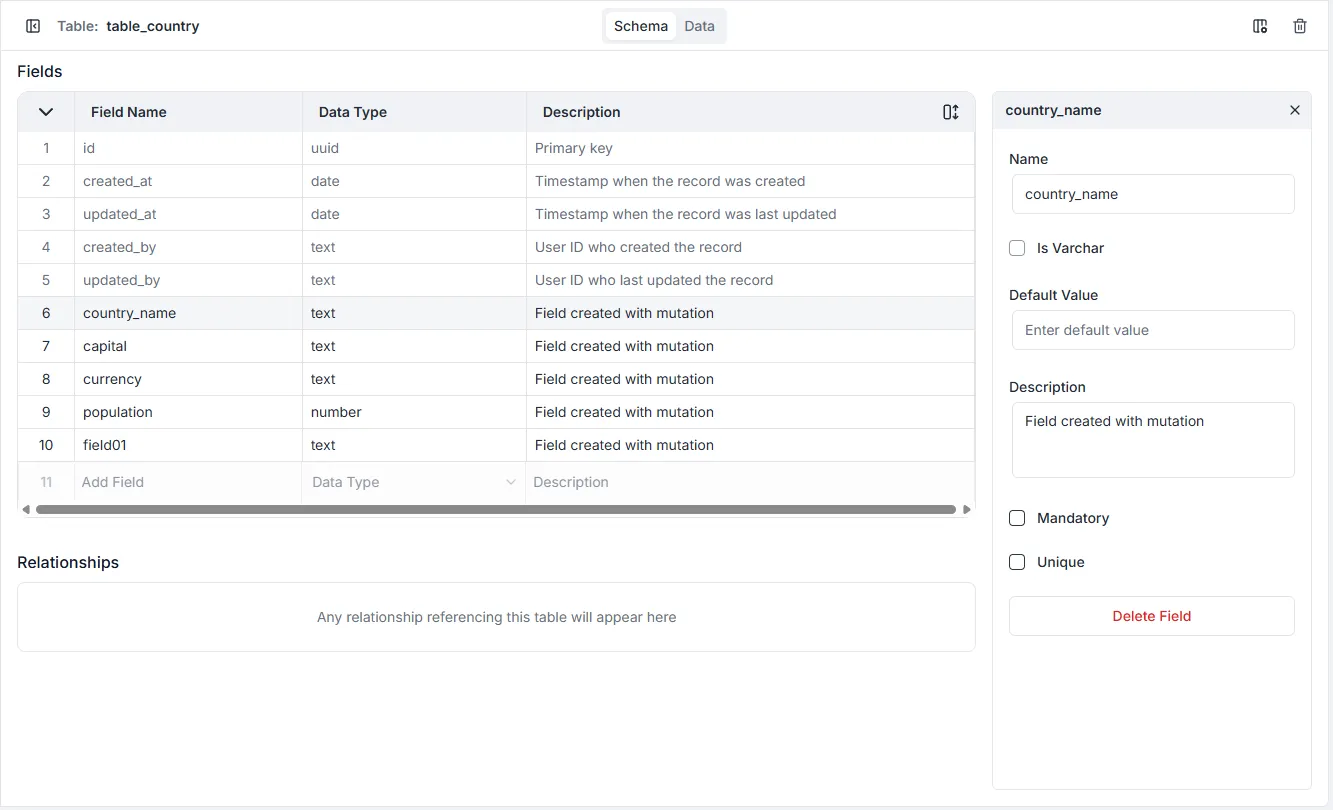
Section titled “Creating Fields”Every field gets defined in a table and requires a name and a type. Field names must be unique in the table, irrespective of their type. Once a new field has been created, a configuration modal will appear allowing for further customizations.
Updating Fields
Section titled “Updating Fields”Fields are updated in the same interface used to create them. Updates to attributes like the field’s name, Default Value and Description - are changed in real-time. Changes to configurations must be saved. If Archie Core detects an issue with the change being made, an alert will display with instructions to fix the issue.
Deleting Fields
Section titled “Deleting Fields”To delete a field:
- Click the field you want to delete
- Click the Delete Field in the Table Settings.
- Confirm in the modal.
- Click Delete.
Danger: Deleted fields cannot be restored and any existing data will be lost.
Field Types
Section titled “Field Types”There are nine field types:
- Number
- Text
- Date
- Boolean
- Jsonb
- Uuid
- Relationship