GraphQL API Overview
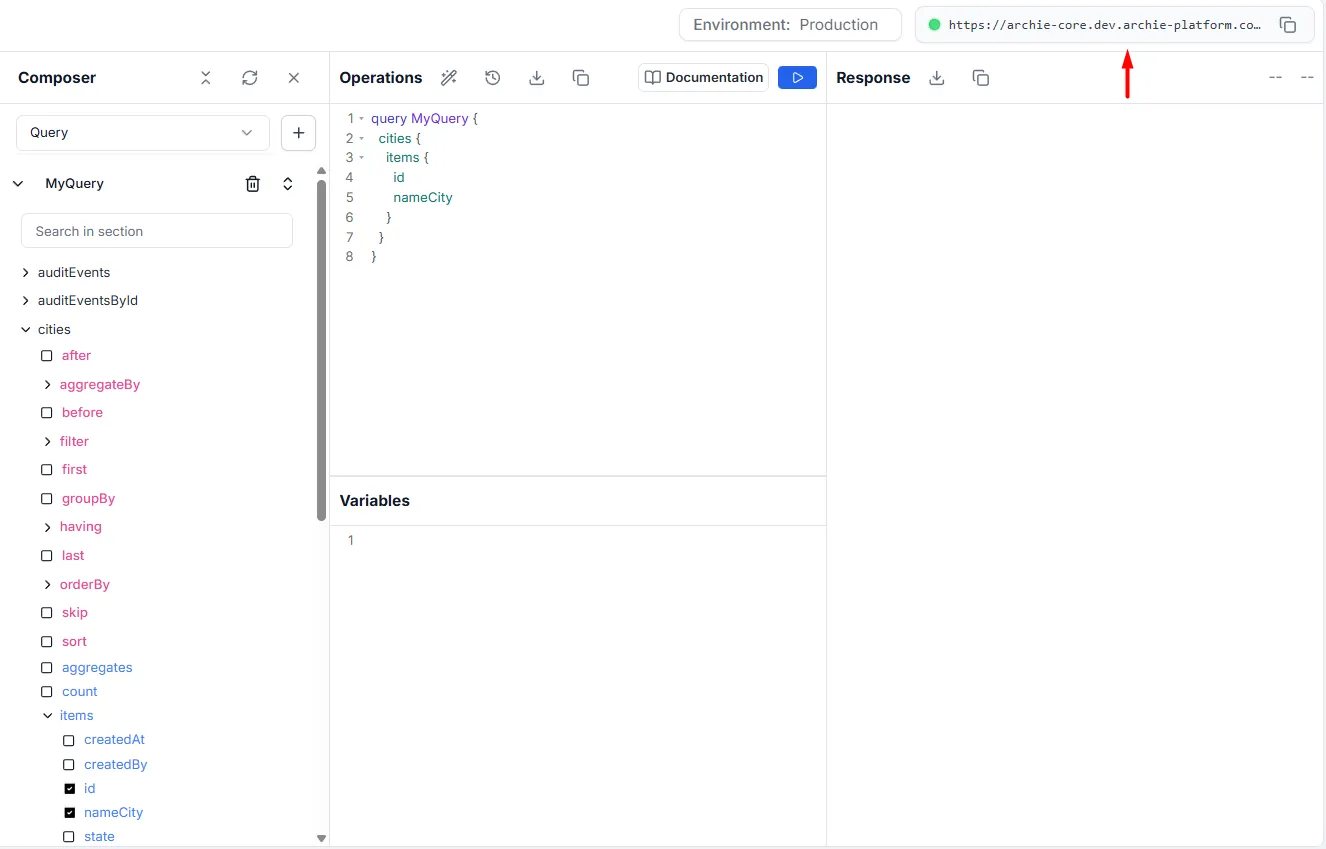
Every project in Archie Core utilizes a unified API endpoint. This single endpoint handles GraphQL queries, mutations, and subscriptions for every data table. The API comes pre-configured with filtering, pagination, full-text search, and other advanced features.
All API requests are sent to the following URL:
https://archie-core.services.archie.com/graphql
To route the request to your specific project, you must include the x-project-id header containing your project ID in every HTTP request.
Understanding Fields
Section titled “Understanding Fields”GraphQL is a specification for requesting fields on objects. Here is a simple Archie Core query that looks for a specific city by its unique id, and requests the nameCity and state fields to be returned.
query MyQuery { citiesById(id: "e14638cb-6d72-4a36-b30f-9b763136a7bb") { id nameCity state }}And here is the result:
{ "data": { "citiesById": { "id": "e14638cb-6d72-4a36-b30f-9b763136a7bb", "nameCity": "Chicago", "state": "Illinois" } }}The result has the same shape as the query. This is key to GraphQL: you always get what you ask for, and the server knows which fields the client is requesting.
Archie Core GraphQL queries are interactive, and support relational queries natively. This mean two important things:
- A query can be changed at any time.
- Related data can be joined without writing complex database queries and serializers.
Understanding Arguments
Section titled “Understanding Arguments”The power of the Archie Core GraphQL API is further enriched by the ability to specify different arguments when executing a query. This has been demonstrated in the example above, where a specific UUID string is being passed as an argument to the query (...citiesById(id: "e14638cb...")).
When creating data tables in the Data Builder, any field marked as unique can then be used as an argument for a query.
For example, since the Cities table has the ID field set to unique (as it is the Primary Key), we can then query a specific City record:
query MyQuery { citiesById(id: "e14638cb-6d72-4a36-b30f-9b763136a7bb") { id nameCity state }}Variables
Section titled “Variables”You can make queries re-usable and dynamic by using variables in the API Explorer.
To work with variables, you need to:
- Replace the static value in the query with the $variableName.
- Declare the $variableName as one of the variables accepted by the query.
- Pass variableName: value in the separate variables dictionary.
Here is the query:
query MyQuery ($filter: StudentsFilter) { students(filter: $filter) { items { firstName email } }}Here is the variable:
{ "filter": { "isActive": { "equals": true } }}And this is the result:
{ "data": { "students": { "items": [ { "firstName": "James", "email": "james.smith@example.com" }, { "firstName": "John", "email": "john.williams@example.com" }, { "firstName": "Mary", "email": "mary.brown@example.com" }, { "firstName": "Mary", "email": "mary.johnson@example.com" }, { "firstName": "Elizabeth", "email": "elizabeth.davis@example.com" } ] } }}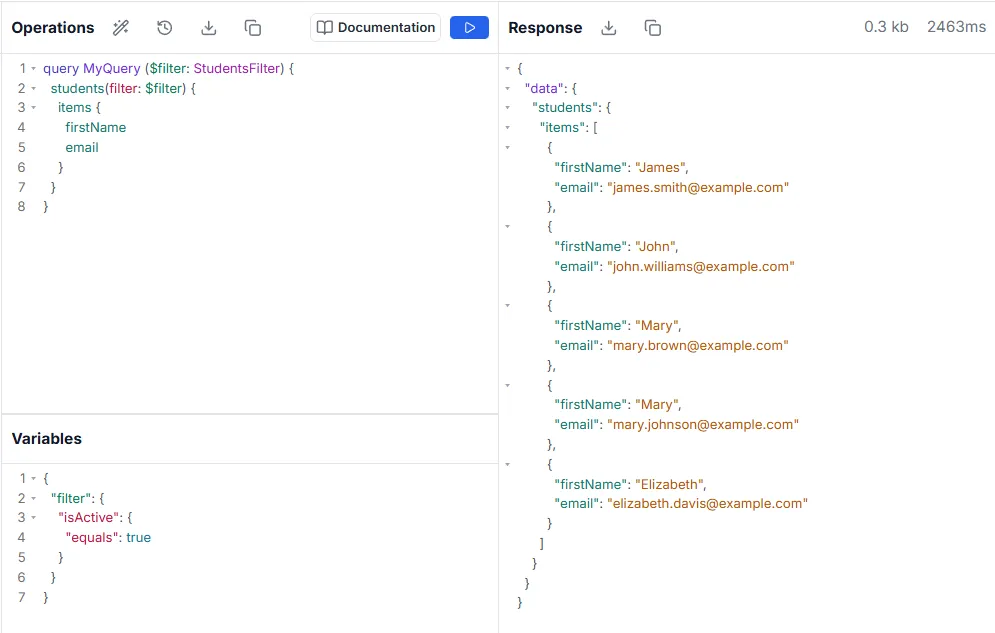
Aliases
Section titled “Aliases”Aliases are used to return objects having different names than their field names. This is needed when fetching the same type of objects with different arguments in a single query.
Below you can see that first city has an alias of “cityOne”:
query MyQuery {  cityOne: citiesById(id: "e14638cb-6d72-4a36-b30f-9b763136a7bb") {    id    nameCity  }
  cityTwo: citiesById(id: "0174dc55-d494-4ebc-a0e9-13575461cad4") {    id    nameCity  }}
Result:
{ "data": { "cityOne": { "id": "e14638cb-6d72-4a36-b30f-9b763136a7bb", "nameCity": "Chicago" }, "cityTwo": { "id": "0174dc55-d494-4ebc-a0e9-13575461cad4", "nameCity": "Miami" } }}Fragments
Section titled “Fragments”Queries can become long and complex. Fragments create a set of fields that can be used to represent the defined set. If you wanted several fields from two different authors, you can use a fragment, instead of repeating the fields twice. In this query, we have a fragment called { ...studentFrag }, which contains several fields:
query MyQuery {  studentA: studentsById(id: "287cff0a-345b-4cca-9e9a-75a2161238fd") { ...studentFrag}
  studentB: studentsById(id: "97fb89ac-e0ad-44f5-b671-24a1b751287c") { ...studentFrag}}
fragment studentFrag on Students {      id      firstName      email      isActive      city {        nameCity        state      }    }
The result:
{ "data": { "studentA": { "id": "287cff0a-345b-4cca-9e9a-75a2161238fd", "firstName": "James", "email": "james.smith@example.com", "isActive": true, "city": { "nameCity": "Chicago", "state": "Illinois" } }, "studentB": { "id": "97fb89ac-e0ad-44f5-b671-24a1b751287c", "firstName": "John", "email": "john.williams@example.com", "isActive": true, "city": { "nameCity": "Seattle", "state": "Washington" }